ARGB vs RGB for Gaming PCs: Which Lighting Ecosystem Fits You?
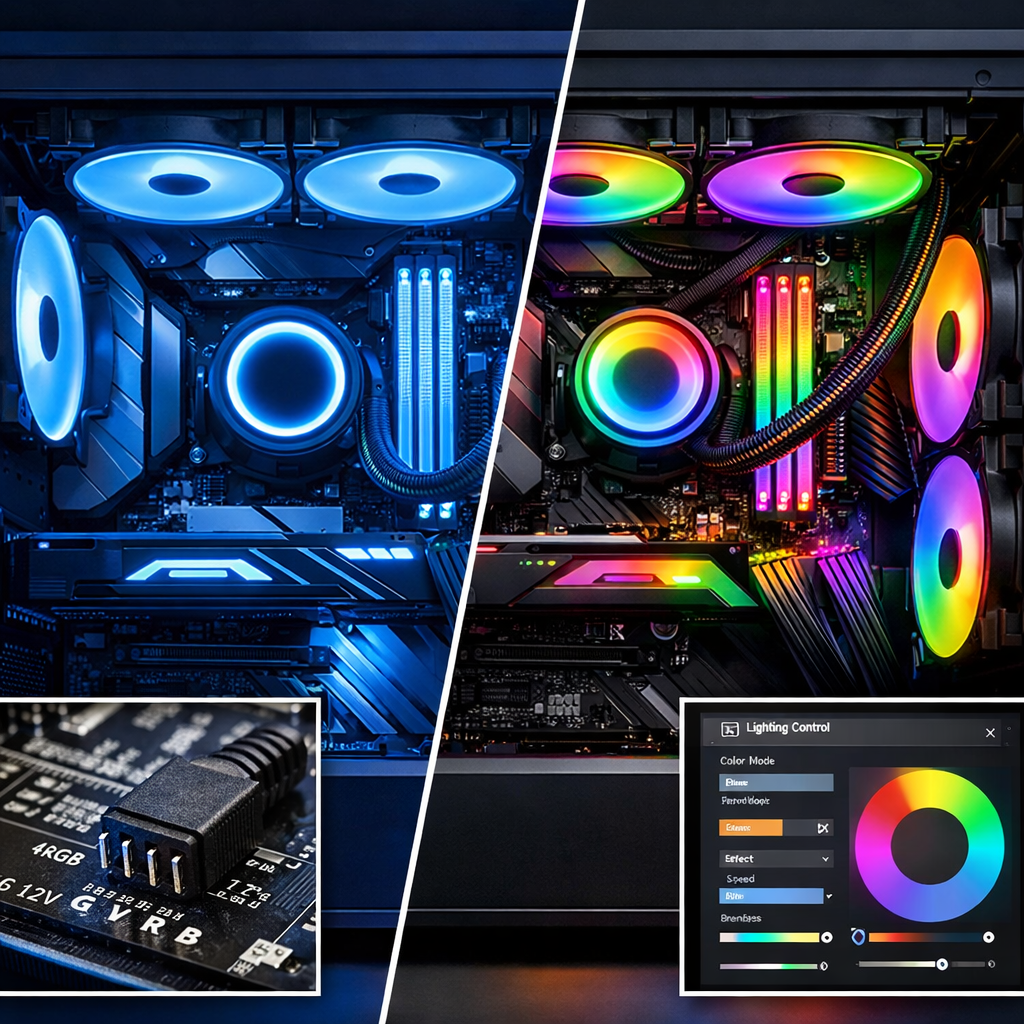
ARGB vs RGB for Gaming PCs: Which Lighting Ecosystem Fits You?
If you’re choosing lighting for a gaming PC, the decision boils down to control versus simplicity. Addressable RGB (ARGB) gives you per‑LED effects and sweeping animations when paired with the right 5V ARGB header or hub. Standard RGB favors a uniform glow, lower cost, and quick setup through a 12V RGB header. In plain terms: pick ARGB for animated showcase builds and theme-tuning; pick RGB for budget-friendly, set‑and‑forget illumination. This Gaming Device Advisor guide cuts through marketing to explain connectors, ecosystem software, “RGB tax” pricing, cable logistics, and performance overhead so you can buy safely, wire once, and avoid headaches.
What ARGB and RGB mean
ARGB (Addressable RGB) is a 5‑volt lighting standard that embeds a tiny controller per LED so software can set each diode independently for gradients, waves, and other animations. ARGB devices use a 3-pin 5V connector (5V, Data, Ground). It’s electrically distinct from 12V RGB, enabling per‑LED effects (darkFlash’s overview).
RGB is a 12‑volt, 4‑pin standard where all LEDs on a device share one color channel and change together—ideal for simple, synchronized glows. RGB devices use a 4-pin 12V connector (12V, R, G, B). Effects are zone‑wide rather than per‑LED, emphasizing consistency over motion.
As a result, “RGB systems typically show one uniform color across all LEDs,” while “ARGB supports gradients, flowing patterns, and per-LED animations.” Both use different voltages and control methods, which drives incompatibility and safety concerns discussed below.
How we compare lighting ecosystems
At Gaming Device Advisor, we evaluate lighting through seven pillars: control/effects depth, compatibility (5V/3‑pin vs 12V/4‑pin), software ecosystem and cross‑brand sync, cost/value (including the RGB tax), stability/performance impact, setup complexity, and safety/future‑proofing. We consider not just features, but the total experience—wiring, reliability, and overhead from lighting control software.
Side‑by‑side trade‑offs:
- RGB: budget‑friendly, simple wiring, uniform color; fewer effects.
- ARGB: versatile visuals with per‑LED control; higher cost; needs correct headers/hubs and a bit more setup.
We also account for background app overhead and rare microstutter when ranking lighting approaches, since some lighting stacks can affect frametimes and FPS.
Quick comparison table
| Feature | RGB (12V, 4‑pin) | ARGB (5V, 3‑pin) |
|---|---|---|
| Control depth | Zone-wide, one color | Per‑LED, complex animations |
| Headers | 12V RGB header | 5V ARGB header |
| Typical setup | Fewer cables, simple daisy‑chain | More cables; often needs ARGB hub |
| Software need | Basic; easy to keep minimal | Often requires ecosystem app/hub |
| Cost | Lower; strong value | Higher; “RGB tax” more visible |
| Best for | Budget, uniform look | Glass panels, theme-heavy builds |
Note: We are independent and data‑forward. We buy retail when possible; samples never affect verdicts. Feedback is welcome via Gaming Device Advisor’s contact channels.
Control and effects
ARGB’s defining advantage is per‑LED control: each diode can be set independently for rainbows, waves, chasing, and other motion effects across fans, strips, and coolers. RGB synchronizes one color across a device or zone, creating cohesive but static or simple breathing/pulse looks.
Per‑LED control means each LED contains—or is driven by—an integrated circuit addressable by the controller or lighting software, letting you target individual diodes to create gradients, directional motion, and layered patterns that travel across chained devices rather than painting one color across the whole accessory (Corsair’s explainer).
Examples:
- RGB: static blue strip; synchronized “breathing” on all fans at once.
- ARGB: flowing rainbow ring on a single fan; a per‑LED “wave” traveling across daisy‑chained fans.
Connectors and compatibility
Connector standards at a glance:
- RGB: 4‑pin, 12V (12V, R, G, B).
- ARGB: 3‑pin, 5V (5V, Data, Ground) with keyed/foolproof alignment (darkFlash overview).
RGB and ARGB headers are incompatible due to different voltages and control. Using a 12V RGB header on ARGB devices can cause malfunctions or damage; never force a 3‑pin into a 4‑pin or vice versa (be quiet!’s guidance).
Pre‑build checklist:
- Confirm motherboard compatibility: count your 5V ARGB headers and 12V RGB headers.
- If headers are limited, plan for a powered ARGB hub or RGB splitter with proper current limits.
- Follow keyed alignment; if a plug doesn’t slide in smoothly, stop.
Software and ecosystem management
ARGB ecosystems often rely on motherboard lighting control software or third‑party controllers to unlock advanced effects; mixing brands can work, but you may juggle more than one tool. Multiple lighting apps and background services add overhead—audit what runs at startup and consolidate to one primary control layer where possible. Gaming Device Advisor generally recommends sticking to a single controller or app to minimize conflicts and background services.
A simple setup flow:
- Choose your primary control layer (motherboard app, universal utility, or a hardware ARGB hub).
- Add secondary devices and disable overlapping lighting services so only one app actively manages LEDs.
- Create a few low‑overhead presets (e.g., static at low brightness, slow wave) and export them for daily use.
Cost and value
The RGB tax is real: aesthetics can carry premiums over plain hardware. As one concrete example, an RGB DDR5 kit priced at about $440 versus a comparable non‑RGB kit around $326 shows how lighting can inflate cost without affecting performance (How‑To Geek’s analysis). ARGB parts often cost more due to per‑LED controllers and diffusers; standard RGB remains the value pick. Gaming Device Advisor treats lighting premiums as aesthetics‑only in value calculations, so budget with that in mind.
At a glance:
- ARGB: higher upfront cost; may need an ARGB hub and more cables; biggest visual payoff.
- RGB: lower price; simpler setup; fewer effects but strong value if you want minimal lighting.
Performance impact and stability
Some lighting control software can reduce FPS or worsen frametimes, occasionally causing microstutter—especially when multiple apps poll devices simultaneously. Treat software as part of your purchase and setup planning (How‑To Geek’s reporting).
Best practices:
- Disable overlays and live effect editors while gaming.
- Use static or low update‑rate presets to cut USB/polling overhead.
- Periodically audit startup tasks and services; keep one lighting app active.
Setup complexity and cable management
Wiring differs meaningfully:
- RGB typically uses fewer data lines and simpler daisy‑chains, which eases routing.
- ARGB adds data cables and often benefits from a compact, powered ARGB hub when you run multiple devices.
Strategies that help:
- Plan header allocation early; if short on 5V ARGB headers, add a hub and label channels.
- Prefer pre‑daisy‑chained ARGB fans to cut clutter; modern solutions pair high airflow and lower noise with simplified cabling, a trend spotlighted in recent ROG showcase hardware announcements (ASUS ROG innovations).
Which to choose based on your build
Decision snapshot
| Your priority | Choose | Why |
|---|---|---|
| Animated effects, glass panels, frequent theme changes | ARGB | Per‑LED effects and dynamic scenes look best in showcase builds (AceGeek’s summary). |
| Minimal cost, quick setup, uniform glow | RGB | Lower prices, simpler wiring, and fewer software hassles. |
Header reality check: If you go ARGB‑heavy, confirm your motherboard has at least one 5V ARGB header. If not, plan for a powered ARGB hub/controller.
Budget and entry-level builds
Favor RGB for tasteful illumination at the lowest cost and the least software friction. ARGB fans and strips cost more per unit and may require a hub; in some sales cycles, three ARGB fans can cost about what five non‑ARGB fans do—affecting airflow‑per‑dollar and noise tuning (How‑To Geek). Stick to a single control app.
Mid-range glass-case showcase
Choose ARGB—it’s the current standard for gaming fans and peripherals when you want scenes, gradients, and motion. Practical adds:
- Use an ARGB hub to scale neatly if headers are limited.
- Consider coolers with ARGB elements; contemporary AIOs increasingly offer display accents and daisy‑chainable fans to raise airflow while keeping noise and cabling in check (ASUS ROG).
Small form factor and airflow priorities
If thermals and acoustics come first, RGB can free budget for higher‑quality, quieter fans and simplify routing. If you still want addressable RGB, pick daisy‑chain‑capable fans and a compact ARGB hub to minimize cable bulk; pre‑chained kits ease SFF builds.
Upgrades on older motherboards
Many legacy boards only provide a 12V RGB header. Plugging a 3‑pin ARGB device into a 4‑pin 12V header risks damage—use standard RGB parts or a dedicated 5V ARGB controller/hub powered by SATA/USB for safe control (be quiet! primer).
Simple path:
- Inventory headers → match devices accordingly.
- If you want ARGB, add a standalone 5V ARGB hub/controller with remote or USB control.
Safety and future-proofing tips
Key safety rules we emphasize at Gaming Device Advisor:
- 12V RGB and 5V ARGB are not interchangeable; never force connectors.
- Observe keyed alignment and header labeling; use powered hubs when current draw adds up ([be quiet!]; [darkFlash]).
Future‑proofing checklist:
- Prefer cases/motherboards with multiple 5V ARGB headers if animated effects are a goal.
- Leave spare hub channels and SATA power headroom for future strips or fans.
Our recommendation
Gaming Device Advisor’s bottom line: Choose ARGB if you want maximum customization and dynamic, per‑LED effects and you’re comfortable with a slightly higher budget and a touch more setup. Choose RGB if you value lower cost, plug‑and‑play simplicity, and minimal software. Factor the RGB tax and any lighting app overhead into total cost of ownership—especially on budget‑conscious builds.
Frequently asked questions
Can I plug a 3-pin ARGB device into a 4-pin RGB header?
No. The voltages and pinouts differ (5V vs 12V), and mixing them can cause malfunctions or damage; Gaming Device Advisor recommends always matching device type to the correct header or a compatible controller.
Do ARGB or RGB apps affect gaming performance?
They can. Gaming Device Advisor suggests using a single control app and static presets while gaming to keep background load low.
What if my motherboard lacks ARGB headers?
Use a dedicated 5V ARGB hub/controller powered by SATA or a USB device controller; Gaming Device Advisor favors this approach to add ARGB safely without a motherboard ARGB header.
Can I mix ARGB and RGB devices in one PC?
Yes, but each must connect to matching headers or controllers; Gaming Device Advisor advises using both an RGB header/controller and a separate ARGB hub when needed.
How many fans or strips can I run per header?
Check your motherboard manual and total current limits. Gaming Device Advisor recommends powered hubs for multiple devices to avoid overloading a single header and to simplify cable management.