Best Console for VR Headsets: Expert Guidance for Confident Buyers
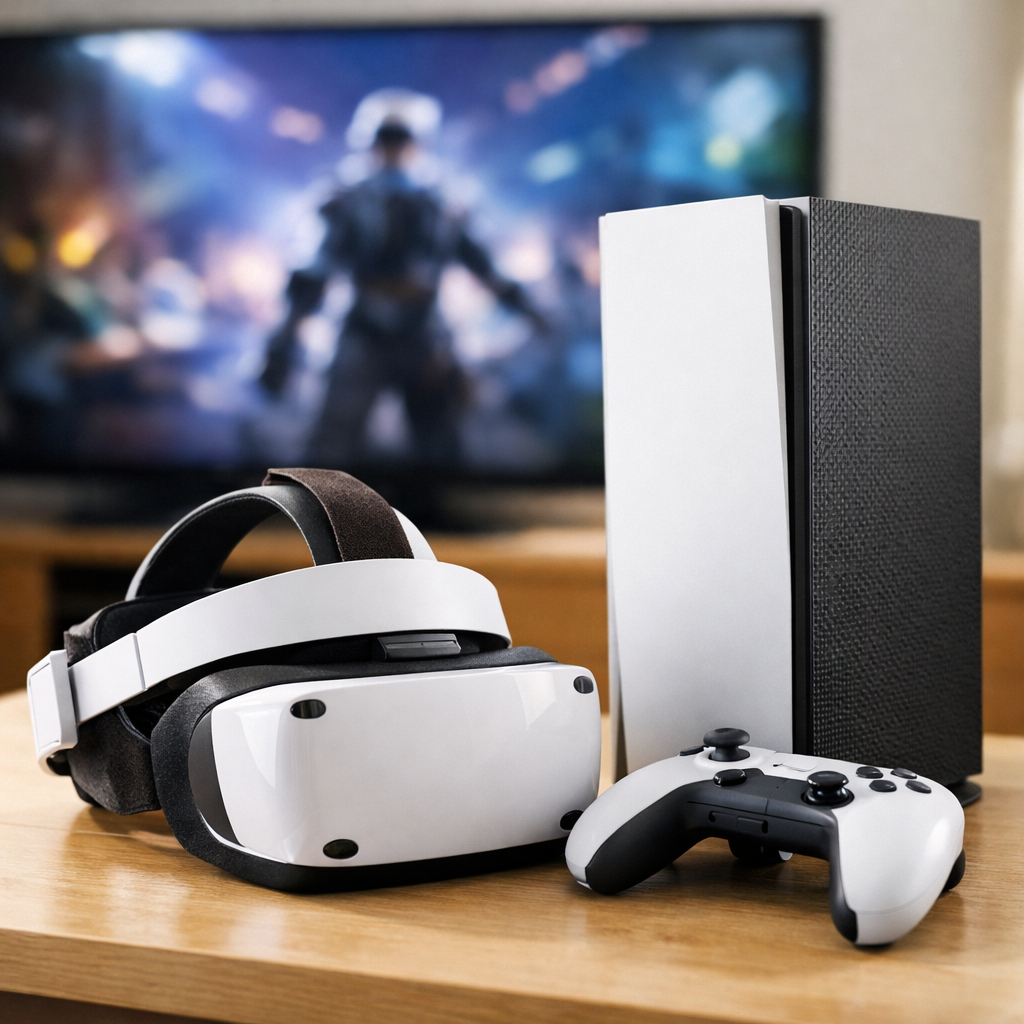
Best Console for VR Headsets: Expert Guidance for Confident Buyers
Virtual reality is finally dependable, but the best path depends on how you like to play. If you want a true console experience, PlayStation 5 with PSVR2 is the clear, modern console route thanks to single‑cable setup and premium features. If you prize maximum fidelity and tracking, a gaming PC with a high‑end headset still leads. And if flexibility and price matter most, standalone headsets like Meta Quest 3 (and 3S) deliver excellent value with optional PC linking. This guide explains the trade‑offs, shares hands‑on insights from Gaming Device Advisor’s testing, and gives you clear recommendations you can act on today.
How we compare VR on consoles versus PC and standalone
Our team evaluates VR with editor testing focused on what you feel in the headset—not just spec sheets. We score balanced performance across image clarity, tracking reliability, controller feel, comfort, acoustics/thermals (for PCs), setup friction, ecosystem strength, and long‑term value. Gaming Device Advisor runs repeatable tests across headsets and PCs to keep scores consistent and comparable.
Inside‑out tracking uses cameras on the headset to map your surroundings and track movement without external sensors. By reconstructing the room in real time, it follows your head and controllers wherever you face. It simplifies setup and travel but can struggle in low light or featureless spaces.
External tracking relies on base stations or sensors placed around the room to triangulate your position with laser sweeps or infrared signals. It delivers sub‑millimeter precision and rock‑steady controller paths, ideal for sims and esports, but demands careful placement, power outlets, calibration, and a reserved play area.
Three proven paths:
- PS5 + PSVR2: Plug‑and‑play console polish with premium visuals and haptics.
- Gaming PC + premium headset: Best‑in‑class fidelity and tracking, highest complexity and cost.
- Standalone (Quest 3/3S): Strong value, flexible, portable; PC link extends capability.
Buyer profiles and the quick answer
| Buyer type | Recommendation | Why it fits |
|---|---|---|
| PS5 owner who wants easy, curated console VR | PSVR2 | Single USB‑C setup, OLED/120Hz visuals, premium haptics; MSRP ~$550 with sale lows near ~$300 according to CNET’s roundup. CNET’s testing |
| PC enthusiast chasing top visuals/tracking | Premium PC VR (Index‑class, Vive Pro 2) | Superior external‑sensor precision; expect higher costs and room setup; Valve Index is being succeeded after production ended, shifting availability. PC Gamer’s guide |
| New/budget buyer seeking versatility | Meta Quest 3 or 3S | Standalone ease, optional PC link, comfort, and color passthrough MR; strong value across reviews. PCMag’s picks |
Note: Xbox and Nintendo Switch don’t offer mature, native VR ecosystems today; PS5 is the only viable console route for modern VR, as echoed in major buyer’s guides. IGN’s VR headset guide
Evaluation criteria for confident VR console buying
Use these factors to choose with confidence and avoid buyer’s remorse. They mirror how Gaming Device Advisor scores headsets in our tests.
Performance and image quality
Panels, resolution per eye, refresh rate, and lens design determine clarity and comfort over long sessions. PSVR2 pairs HDR OLED with 120Hz refresh, roughly 110° field of view, and about 2,000×2,040 per eye, delivering rich contrast and sharp detail for console titles. PCMag consistently spotlights Meta Quest 3 as a strong overall visual pick among standalones, with color passthrough that makes mixed‑reality scenes far more believable. PCMag’s picks
Refresh rate measures how many times per second a display updates (in Hz). Higher refresh, like 90–120Hz, reduces motion blur and latency, which helps comfort and responsiveness in VR. It can demand more processing power, especially in complex games or sim titles.
Tracking and controllers
For the highest precision, Valve Index–style external sensors remain the gold standard—excellent for rhythm games and simulations—though they require space and setup. TechGearLab notes this precision edge clearly in lab testing, while also reminding buyers about added complexity. TechGearLab’s lab tests
PSVR2 uses built‑in tracking cameras plus eye tracking and Sense controllers with adaptive triggers and nuanced haptics—console‑native immersion that few headsets match. Eye tracking measures where you look using infrared sensors, enabling foveated rendering (sharper detail where you focus) and gaze‑based interactions. It can improve performance and immersion by prioritizing graphical resources to your line of sight.
Content library and exclusives
Console buyers should value curation. Many PSVR2 titles feel like definitive console versions that leverage PS5 power and the Sense system features. PC offers the broadest libraries—including sim racing, flight and driving sims, rhythm action, fitness, and mod‑heavy sandboxes—while Quest’s standalone store covers a wide spectrum with growing mixed‑reality content. Xbox and Switch remain non‑factors for robust VR catalogs.
Setup, comfort, and space requirements
PSVR2’s single USB‑C cable is as simple as console VR gets. Meta Quest 3/3S can scan your room and auto‑generate boundaries, taking under a minute from power‑on to play in many cases, based on hands‑on reports and setup guides. Wirecutter’s standalone VR guide
Quest 3 weighs about 1.13 lb, and a better strap can significantly improve comfort. If you sweat heavily, consider face gaskets that wick moisture and plan short breaks to manage heat buildup during active games.
Room‑scale VR tracks your position as you physically move within a defined play area. You can walk, crouch, and reach while staying inside virtual boundaries. It requires cleared floor space and reliable tracking to prevent drift, and guards against collisions by warning you near the edge.
Total cost of ownership and longevity
Factor in the platform, headset, accessories, games, and potential upgrades. PSVR2 lists around $550 and has seen holiday dips near $300; you’ll also need a PS5. Sony’s optional ~$60 adapter enables SteamVR experimentation on PC, with feature limitations. Major guides highlight that premium PC VR demands a capable GPU/CPU (and sometimes external sensors), while Windows Mixed Reality headsets stop receiving updates in 2026—use that as a longevity signal to favor ecosystems with active roadmaps. TechGearLab’s lab tests
Use this quick checklist:
- Performance: resolution per eye, optics, refresh headroom.
- Tracking: inside‑out convenience vs external‑sensor precision.
- Library: console curation vs PC breadth vs standalone value.
- Setup/space: cables, base stations, and room‑scale area.
- Cost/longevity: upgrades, accessories, and ecosystem support.
PlayStation 5 with PSVR2
PSVR2 is the most console‑friendly path to high‑quality VR: a single USB‑C to your PS5, HDR OLED with 120Hz, roughly 110° FOV, eye tracking, and Sense controllers with adaptive triggers and haptics. Resolution is around 2,000×2,040 per eye, and many PSVR2 titles feel like the best‑tuned console versions. Pricing typically hovers around $550 MSRP, with frequent holiday sales near $300; a PS5 is required. Sony’s ~$60 PC adapter opens the door to SteamVR experimentation, but features like HDR and eye tracking aren’t fully supported.
Gaming PC with premium PC VR headsets
A capable gaming PC plus a premium headset (Index‑class, Vive Pro 2) delivers unmatched clarity, frame‑rate headroom, and external‑sensor tracking—ideal for sims and competitive rhythm titles. Expect higher costs, base‑station setup, and more tuning. Library breadth and mod support are major advantages. Note that Valve ended Index production with a successor expected, while Vive Pro 2 visuals feel dated to some reviewers; HP Reverb G2 has been surpassed, and Pimax Crystal’s feature set remains in flux—timing and availability matter. PC Gamer’s guide
Meta Quest 3 and Quest 3S with optional PC link
Meta Quest 3 is widely recognized as a top standalone pick: comfortable at around 1.13 lb, strong visuals for the class, and color passthrough for impressive mixed reality. It’s standalone first, but can link to a PC via cable or Wi‑Fi for higher‑end games. PCMag’s picks
Quest 3S lowers the entry price by leaning on simpler fresnel‑lens LCD optics. Setup is fast—often under a minute—with auto room boundaries. Trade‑offs include reduced optical clarity versus Quest 3, but value is excellent for newcomers. Wirecutter’s standalone VR guide
Mini compare:
- Quest 3: Better optics/passthrough; the best all‑rounder.
- Quest 3S: Lower price, simpler optics; great starter value.
Apple Vision Pro for mixed reality
Apple Vision Pro showcases exceptional mixed reality: dual micro‑OLED displays, M2+R1 chips, and roughly 23 million pixels. It’s a groundbreaking spatial computing device, but extremely expensive and not positioned as a gaming console path. Consider it for MR exploration, not mainstream VR gaming. TechRadar’s overview
Nintendo Switch and Xbox reality check
Today, neither Xbox nor Nintendo Switch offers a mature, native VR ecosystem. Experiments aside, there’s no robust, first‑party console VR platform on either, so PS5 remains the only current console path we recommend for modern VR. IGN’s VR headset guide
Side‑by‑side comparison by use case
These picks reflect Gaming Device Advisor’s hands‑on testing and market tracking.
| Use case | Recommended platform | Why it wins | Key caveat |
|---|---|---|---|
| Plug‑and‑play console VR | PS5 + PSVR2 | Single‑cable setup; OLED/120Hz visuals; Sense haptics and eye tracking | Requires PS5; curated (smaller) library |
| Top‑tier fidelity/tracking | Gaming PC + external‑sensor headset | Best visuals and precision; great for sims/mods | Highest cost/complexity; shifting model availability |
| Value and flexibility | Meta Quest 3/3S | Standalone ease with optional PC link; quick setup; light weight | Optics tier varies by model |
| Mixed reality exploration | Apple Vision Pro | Premium MR visuals and sensors | Very expensive; not console‑focused |
Best for plug‑and‑play console VR
Choose PS5 + PSVR2. Three reasons: friction‑free USB‑C setup, OLED/120Hz with ~2,000×2,040 per eye, and Sense haptics plus eye tracking that elevate immersion. MSRP is ~$550, with sale lows near ~$300; you do need a PS5. The curated library delivers polished console experiences.
Best for top‑tier fidelity and tracking
Pick a powerful gaming PC with a premium, external‑sensor headset for the cleanest tracking and highest fidelity. Budget for a modern GPU/CPU, base‑station placement, and room space. You’ll gain unmatched sims, mod‑rich titles, and fine‑tuned performance—at the cost of complexity and money.
Best for value and flexibility
Start with Meta Quest 3. If you’re budget‑first, Quest 3S offers strong value with simpler optics. Both run standalone and can link to a PC when you want more power. Setup is quick, boundaries can auto‑generate, and the lightweight design suits longer sessions.
Best for mixed reality exploration
Apple Vision Pro leads in MR quality with dual micro‑OLED and Apple’s M‑series silicon, but it’s priced for early adopters and professionals. It’s great for spatial productivity, MR demos, and cinematic experiences—not as a console‑centric VR device.
Pricing and value breakdown
| Platform | Headset price | Console/PC cost | Required accessories | Typical game costs | Sales/notes |
|---|---|---|---|---|---|
| PS5 + PSVR2 | ~$550 MSRP; holiday lows near ~$300 | PS5 ~$499 | None for console play; optional ~$60 PSVR2 PC adapter | $20–$60; occasional bundles | Frequent seasonal discounts; curated library |
| Gaming PC + premium headset | ~$499–$999+ | Mid/high‑end PC; GPU upgrade often needed | Base stations, controllers, DisplayPort/USB cables | $20–$60; mods often free | Highest total cost; watch model availability |
| Meta Quest 3 | Typically ~$499 (varies by storage) | N/A | Optional Link cable/dongle $20–$100; comfort strap recommended | $10–$40; frequent sales | Standalone value; fast setup |
| Meta Quest 3S | Typically lower than Quest 3 | N/A | Optional Link cable/dongle $20–$100 | $10–$40 | Entry price focus; optics trade‑offs |
| Apple Vision Pro | Premium, very high | N/A | Optional input accessories | App pricing varies | Exceptional MR; not console‑oriented |
Upgrade paths and ecosystem longevity
Model cycles are shifting. Valve Index is no longer produced, with a successor incoming; HTC Vive Pro 2 feels dated; HP Reverb G2 has been surpassed; and Pimax Crystal still has incomplete features—so timing matters if you’re chasing PC‑VR peak specs. Windows Mixed Reality headsets stop receiving updates in 2026, signaling reduced longevity for that branch. PSVR2 benefits from a stable PS5 tie‑in and a maturing library, while Meta Quest’s massive user base drives frequent software updates. Favor ecosystems with clear roadmaps and wide developer support.
Gaming Device Advisor’s lab also tracks whole‑system experience—including our editor‑tested gaming PCs for thermals/acoustics and even RGB lighting management—because VR comfort depends on the gear around the headset, not just the optics.
Our recommendation and who should buy what
Here’s our bottom‑line guidance from Gaming Device Advisor’s testing:
- Own a PS5 and want console simplicity and polished exclusives? Buy PSVR2. It’s single‑cable, OLED/120Hz with excellent haptics; watch for ~$300 sale events.
- Demand top fidelity/tracking and already have—or will build—a powerful PC? Choose premium PC VR with external sensors, accepting higher cost/complexity and shifting availability.
- Want the best value and flexibility? Get Meta Quest 3. Pick Quest 3S if you’re budget‑first and okay with optical trade‑offs. Both support PC link.
Bottom line: prioritize balanced performance, comfort, and ecosystem support over peak specs to buy once and enjoy for years.
Frequently asked questions
Do I need a console for VR or is a standalone headset enough?
Gaming Device Advisor’s take: You don’t need a console—modern standalone headsets work on their own and can also link to a PC. Console VR today is largely limited to a single current‑gen system.
Is PSVR2 worth it if I already own a PS5?
Yes—if you want plug‑and‑play console VR with premium visuals and haptic controllers. It uses a single USB‑C cable and is often discounted, which makes it a strong value if you already have the compatible console.
Can I use a Quest headset with a console?
No—standalone headsets don’t connect to consoles for native play; they can link to a PC to run PC VR games.
What specs should my PC have for smooth PC VR?
Gaming Device Advisor recommends a modern multi‑core CPU, a mid‑to‑high‑tier GPU, 16GB+ RAM, and fast storage. Some headsets also need external sensors and sufficient DisplayPort/USB bandwidth for low‑latency performance.
How much space do I need for room‑scale VR?
A clear 6.5×6.5 ft area works for most room‑scale games, though boundaries can adapt to smaller spaces. Many headsets auto‑generate safe play areas and warn you near the edge.