Budget-Friendly RGB Lighting Upgrades That Make Gaming PCs Pop
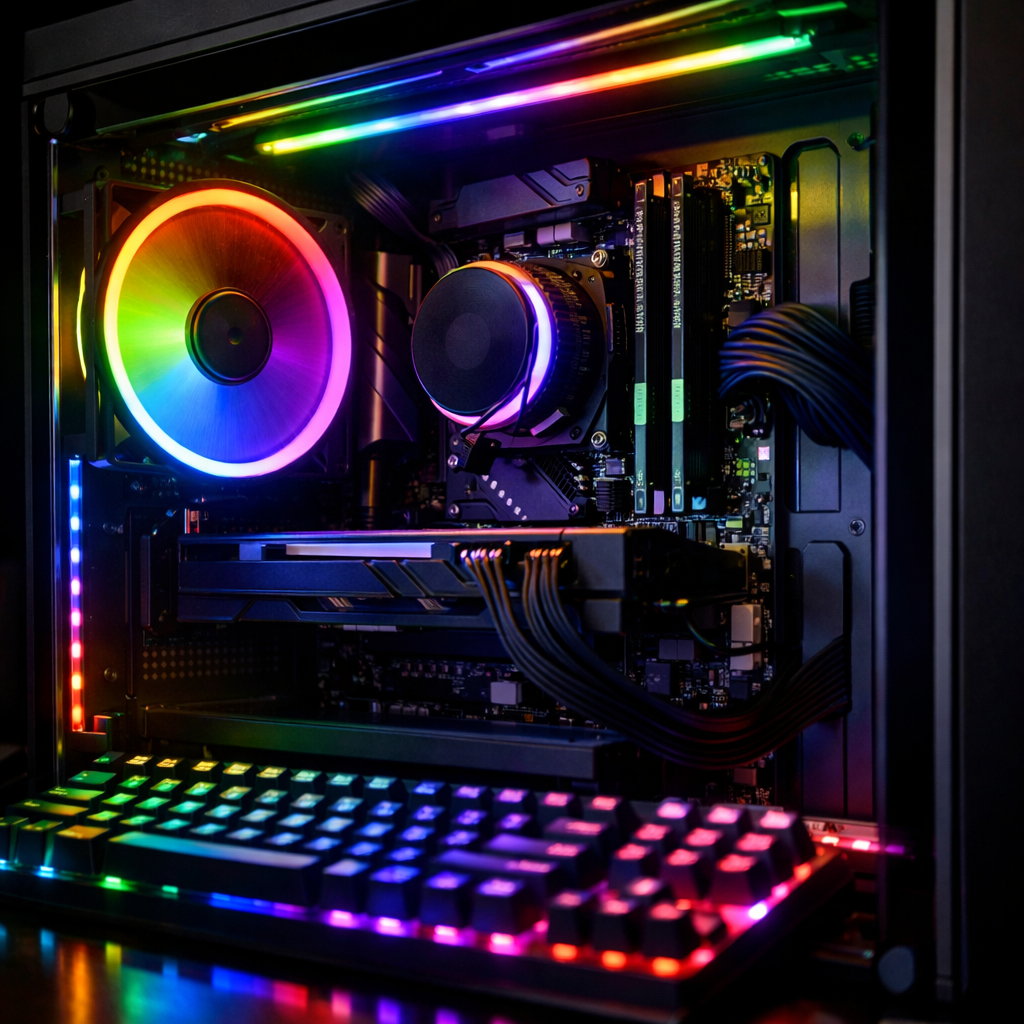
Budget-Friendly RGB Lighting Upgrades That Make Gaming PCs Pop
A few smart RGB additions can make a gaming PC look brand-new without gutting your wallet. The best budget RGB lighting for gaming PCs focuses on visible surfaces—front fans, a single quality LED strip, and tasteful accents—while keeping airflow, noise, and software in check. Most reputable RGB variants cost only a few dollars more than their plain counterparts, so you can refresh your build’s style with minimal spend. In this guide, we map the standards (5V/3‑pin ARGB vs 12V/4‑pin RGB), show how to plan a clean ecosystem and hub layout, and rank upgrades by “visual pop per dollar.” You’ll get clear wiring rules, sync tips, and performance-first guardrails—so your PC glows without paying the RGB tax.
Gaming Device Advisor
Our picks are verification-first: we weigh frame rates, thermals, and acoustics alongside lighting ecosystems, wiring standards, and software stability. That means we recommend RGB only where it won’t degrade airflow or add noise, and we favor parts that sync simply and safely with your board. Expect practical compatibility guidance—5V/3‑pin ARGB vs 12V/4‑pin RGB, SATA- or USB‑powered hubs, and cross-brand sync—so you “buy once,” skip returns, and avoid the RGB tax. Many RGB kits are only $5–$10 more than non-RGB, as noted by PC Gamer’s budget RGB feature (linked below).
What makes RGB budget friendly and high impact
RGB lighting is a style upgrade, not a performance booster. It doesn’t raise FPS, but it can transform how a build looks with low-cost additions like addressable strips and fans—often for a modest premium. PC Gamer notes many RGB kits carry only a $5–$10 uplift versus non-RGB, making them an easy visual win for budget builders. The “glass case multiplier” is real: tempered-glass, fishbowl-style cases dramatically increase lighting visibility and perceived value, a trend mirrored by Tom’s Hardware’s analysis of “peak RGB” and stealth vs. show builds.
Definition: RGB lighting is a cosmetic illumination system using red, green, and blue LEDs built into PC parts or accessories. It doesn’t increase FPS or compute performance but enhances aesthetics. Budget upgrades like fans, strips, and RAM diffusers deliver large visual impact for minimal added cost.
High-impact, low-cost targets:
- Front/top RGB case fans (visible through mesh/glass; don’t compromise airflow)
- One inner-bezel ARGB strip (diffused edge glow behind glass)
- RGB RAM or heat spreader diffusers (central, always‑visible lighting)
Windowed cases maximize payoff.
ARGB vs RGB standards and why it matters
ARGB offers per‑LED control for gradients and animations, while classic RGB sets one color across all LEDs. ARGB became common around 2018 and requires 5V/3‑pin headers or dedicated controllers; classic RGB uses 12V/4‑pin headers. Never mix 5V ARGB devices into 12V RGB headers—mismatches can permanently damage hardware. Verify your motherboard’s header types and each accessory before purchase. Gaming Device Advisor’s standing rule: read the header labels twice before powering on.
Definition: Addressable RGB (ARGB) is a 5V, 3‑pin lighting standard that lets software control each LED individually for gradients and animations. Classic RGB is a 12V, 4‑pin standard where all LEDs share one signal, showing a single color/effect. Mismatching connectors can damage hardware.
| Feature | ARGB (Addressable) | RGB (Classic) |
|---|---|---|
| Header type | 3‑pin (often marked 5V/D/GRD) | 4‑pin (often marked 12V/G/R/B) |
| Voltage | 5V | 12V |
| Connector shape | 3‑pin keyed, one pin absent | 4‑pin inline |
| Control granularity | Per‑LED animations and gradients | One color/effect across the strip |
| Typical use | Fans, strips, RAM diffusers, hubs | Older strips, basic logo lighting |
| Required control | Motherboard ARGB header or USB controller | Motherboard RGB header or basic controller |
| Pros | Rich effects, fine sync | Simple, widely compatible on older gear |
| Cons | Easier to overload channels; must match 5V | Limited effects; 12V only |
Plan your ecosystem and software sync
Pick one primary ecosystem—usually your motherboard’s lighting software (ASUS Aura, MSI Mystic Light, Gigabyte RGB Fusion, ASRock Polychrome)—and build around it. CLX’s overview of RGB control science highlights that consolidating on a single controller stack reduces conflicts and smooths animations. Check each device’s support list and controller protocol, and prefer devices with native sync to your board. Gaming Device Advisor favors board‑native control to minimize conflicts and driver bloat.
A simple planning flow:
- Inventory headers: count 5V/3‑pin ARGB and 12V/4‑pin RGB on your motherboard.
- Choose master software: your board’s suite should be the “source of truth.”
- Select compatible devices: prioritize native support for your master software.
- Plan hub channels: map LED count per channel; leave 1–2 spare ports for growth.
- Test profiles early: connect one device at a time, verify control, then expand.
Power and hub choices for clean installs
For multiple ARGB devices, use a SATA‑powered ARGB hub to ensure stable brightness and avoid overloading motherboard headers. USB‑connected controllers add advanced effects and tighter software control. Calculate total LED count per channel and stay within the hub/controller’s rating; use dedicated hubs if your board lacks headers. Modular, hub‑driven kits also centralize control and cut software clutter. Gaming Device Advisor typically prefers SATA‑powered hubs from reputable makers for consistent current delivery.
A tidy wiring map:
- PSU SATA power → ARGB hub
- ARGB hub → 5V/3‑pin devices (fans, strips, RAM diffusers)
- Optional: USB 2.0 internal header → controller (for software effects)
- Hub data/sync lead → motherboard 5V/3‑pin ARGB header
Upgrades that deliver the most visual pop per dollar
Our ranked picks for maximum impact in windowed cases:
- RGB case fans with good diffusion and performance parity
- One high‑quality ARGB LED strip along the inner bezel
- RGB RAM or heat spreader diffusers
- Subtle PSU shroud edge lighting or tasteful cable effects
- Desk/room ambient lighting to amplify the PC’s glow
Budget fans and strips remain the cheapest flair upgrades, but always match airflow/noise to solid non‑RGB options before buying. Gaming Device Advisor treats airflow and noise parity as non‑negotiable.
RAM heat spreaders and RGB memory kits
RGB RAM adds centrally located lighting while potentially upgrading capacity and speed. Match the kit to your CPU/motherboard QVL to ensure stability, and favor modules with uniform diffusers for smooth effects and native software sync. Many RGB variants cost only about $5–$10 more than plain kits, making them easy wins.
Case fans with balanced airflow and noise
Not all RGB fans are created equal: pro-grade non-RGB models often move more air, last longer, and run quieter. ComputerBarn’s performance-first guide underscores prioritizing airflow, static pressure, and quality bearings over glow alone. Choose PWM fans with rubber dampers and verified airflow/pressure specs, and ensure you can dim or disable lighting—some users find constant effects distracting, a common refrain in Reddit discussions on RGB lighting trends. Also see community threads questioning RGB longevity in build culture for perspective. Gaming Device Advisor tests for airflow, pressure, and noise targets before recommending RGB variants.
LED strips for edge glow and underglow
LED strips are RGB staples—the tech keeps evolving, but fundamentals are the same: even diffusion and smart placement deliver the wow. Place a single high-density ARGB strip along the case’s inner bezel, motherboard-tray edge, or PSU shroud lip for soft edge glow, and consider a rear underglow strip for desk ambience. Brands like Phanteks offer inexpensive, well-diffused strips; verify whether a strip is addressable before buying and connect 5V ARGB strips to ARGB headers or a controller. Gaming Device Advisor prioritizes high-density LEDs and quality diffusion to avoid hotspots.
PSU shroud and cable extension lighting
A short, diffused strip along the PSU shroud edge adds a clean “light shelf” without impeding airflow. For extra flair, limited-run RGB cable extensions or Strimer-style power cables create a high-visibility accent—purely aesthetic, not performance-related. Keep leads routed along the shroud and behind the tray into a hub for a professional finish.
Desk and room lighting for ambient impact
Ambient lighting multiplies in-case effects. PC Gamer’s roundup of the best RGB lighting kits spotlights options from Elgato, Govee, Nanoleaf, and Logitech; a Nanoleaf Essentials Matter bulb is a smart, affordable start. Bias lighting behind monitors and under-desk strips add immersion and decor value—even when the PC sits under the desk.
Placement strategies that preserve thermals and silence
- Do place strips along edges, fan frames, and the PSU shroud—never across intake/exhaust paths.
- Do maintain front mesh intake and use PWM fan curves to keep acoustics in check.
- Do prefer transparent fan hubs with aerodynamic blades and quality bearings.
- Don’t add dense cable lighting that blocks airflow or snags filters.
- Don’t overload top exhaust with restrictive grills that impede heat evacuation.
Performance-first principles still win: airflow, build quality, and low noise should outrank glow.
Safety and wiring best practices
- Hard rule: never plug 5V/3‑pin ARGB into 12V/4‑pin RGB. Label cables and headers; respect keyed connectors and use hub caps to block unused ports.
- Checklist: power off and flip PSU switch; map headers; connect one device; test; expand; then secure with cable ties/adhesive mounts.
- Prefer SATA‑powered hubs for multi-device setups; validate total current draw and LED/channel limits. Avoid unknown splitters with no ratings.
Future proofing your lighting setup
Choose devices with open 5V ARGB support and broad motherboard software compatibility; avoid proprietary-only connectors unless they include a robust controller. Leave spare hub channels and some cable slack for future parts, and favor controllers using standard internal USB 2.0 headers. While the market may be past “peak RGB,” the ecosystem persists across components—standards-based gear keeps your upgrade path open.
Verification-first selection criteria
Use this quick scoring framework before you buy:
- Compatibility: native 5V/3‑pin ARGB (or 12V/4‑pin if required), keyed connectors, header match
- Software sync: supports your board’s suite; minimal extra drivers
- Performance parity: airflow/pressure and noise match reputable non‑RGB peers
- Build quality: bearings, diffuser uniformity, cable sleeving, secure adhesives
- Power/hub needs: LED count per channel, SATA‑powered hub support, USB control (if needed)
- Cable management: adequate lengths, daisy-chain options, low clutter
- Warranty/support: clear RMA terms, active updates
- Price delta: aim for the $5–$10 RGB uplift where possible for top value
This is the same framework Gaming Device Advisor uses to vet budget-friendly RGB recommendations.
Frequently asked questions
What is the difference between 3-pin ARGB and 4-pin RGB and which should I buy
3‑pin ARGB (5V) controls each LED for animations; 4‑pin RGB (12V) sets one color across all LEDs. Gaming Device Advisor recommends ARGB if your board has 5V headers, and 12V RGB only when that’s what your gear supports.
Can RGB lighting affect FPS thermals or noise
RGB doesn’t raise FPS; it’s purely visual. Gaming Device Advisor advises matching airflow/noise specs to good non‑RGB models and using smart fan curves to avoid thermal or acoustic penalties.
How do I sync lights across different brands without extra software bloat
Pick your motherboard’s software as the master and buy devices that support it. Gaming Device Advisor suggests running everything through a single ARGB hub to keep one profile in charge.
Do I need a dedicated ARGB hub if my motherboard has limited headers
Yes—for multiple ARGB devices or to keep brightness stable and cabling tidy. Gaming Device Advisor recommends a SATA‑powered hub so one board header can sync many devices.
What are the easiest RGB upgrades under 50 dollars that actually look good
Add a quality ARGB strip along the inner bezel or swap in one or two front RGB fans. For zero case work, Gaming Device Advisor often suggests a smart bulb or monitor bias light to boost desk ambience.
If you want deeper gear picks and setups by budget, see our guide to immersive RGB lighting setups on Gaming Device Advisor.