Gaming Laptops Under $1000 vs Premium: FPS, Thermals, Build Quality
Gaming Laptops Under $1000 vs Premium: FPS, Thermals, Build Quality
Comparison overview
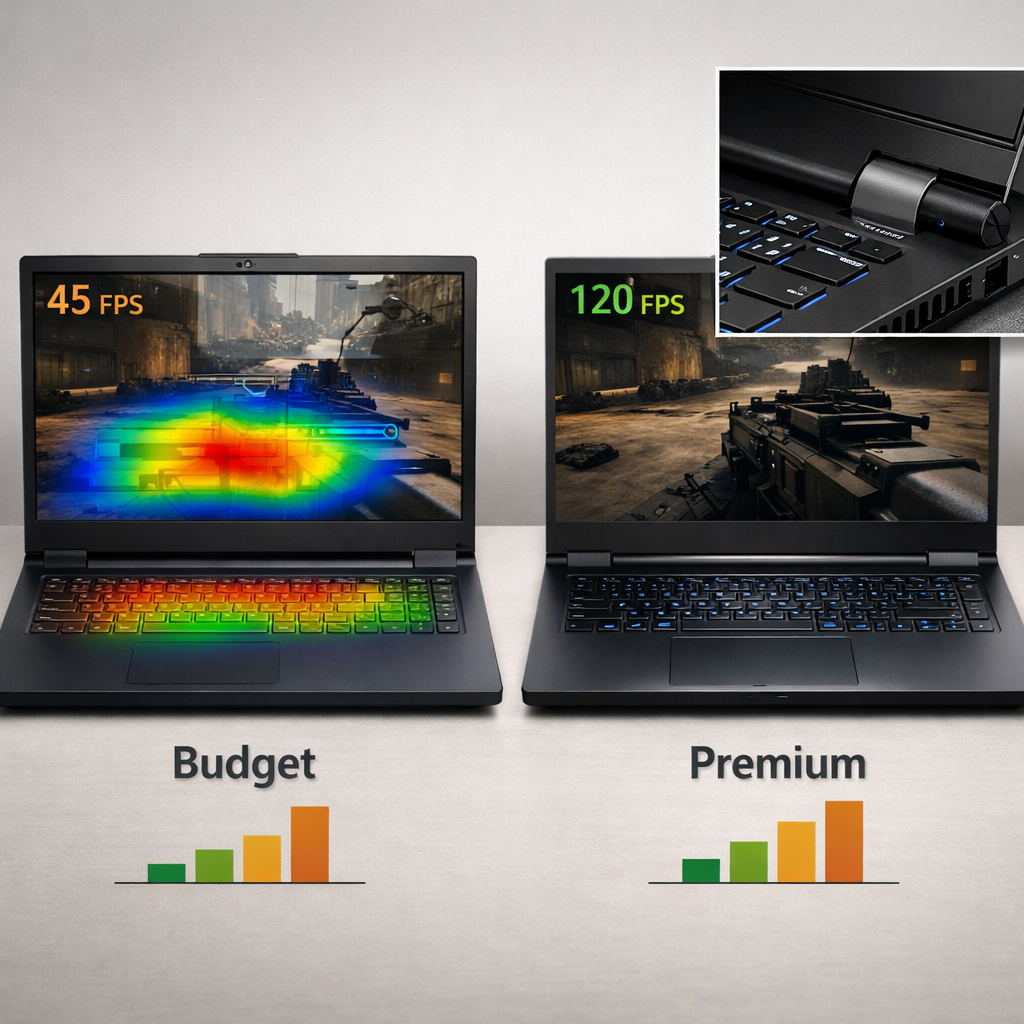
If you’re shopping under $1,000, set your sights on smooth 1080p. Laptops in this tier handle esports at high refresh and deliver playable FPS in modern AAA at medium–high, but they run hotter and louder than pricier rigs. A strong example is the Acer Nitro 16 (Ryzen 5 + RTX 4050) with a 165Hz 1920×1200 panel that “played most of our benchmark games well,” making it a dependable 1080p value according to Tom’s Hardware’s under-$1,000 picks. Premium designs scale performance further with higher-power GPUs and larger cooling for steadier, quieter FPS in long sessions.
Premium gaming laptops are models typically priced above $1,000–$1,500 that pair higher-tier GPUs/CPUs with larger thermal solutions and upgraded chassis materials. The goal is to sustain higher frame rates—especially at 1440p and beyond—while keeping noise and temperatures lower during extended play. At Gaming Device Advisor, we frame this choice around sustained FPS, thermals, and build quality—not just peak benchmarks.
As seen across Adorama’s under-$1,000 roundup, budget models commonly feature RTX 3050/4050-class graphics with 16GB RAM and a 512GB SSD.
| Pillar | Under $1,000 | Premium ($1,000–$1,500+) |
|---|---|---|
| 1080p esports FPS | Often 120–165+ at high/competitive | 165–240+ with more headroom |
| 1080p AAA FPS | ~60–90 at medium–high | 90–120+ at high–ultra |
| 1440p capability | Playable at medium (often 40–70 FPS) | High–ultra 80–120+ with upscaling |
| Thermals/noise | Smaller heatsinks; hotter surfaces; louder fans under load | Larger cooling; lower noise; steadier clocks |
| Materials | Mostly plastic; some flex; practical but basic | Aluminum/magnesium, firmer hinges, refined feel |
| Typical GPU classes | RTX 3050/4050; occasional entry newer-gen at lower power | RTX 4060/4070 or newer 5060/5070/5080 with higher TGP |
Evaluation criteria
At Gaming Device Advisor, we evaluate gaming laptops using a consistent, replicable checklist:
- Performance tiers and metrics
- Esports (1080p) at high/competitive settings; report average FPS and 1% lows
- AAA at native resolution with medium–ultra presets; average FPS and 1% lows
- Hardware factors
- GPU class and total graphics power (TGP), CPU generation and cores/boosts
- Cooling design (heat pipes vs vapor chamber), chassis materials and build
- Display resolution/refresh, brightness, color, sync tech
- Experience factors
- Noise under load, battery life, port selection and layout, webcam/mic/speakers
- Upgradeability (SODIMMs, M.2 bays, Wi‑Fi card), and ease of service
- Buyer protection
- Verify warranty terms and region coverage; buy from official sellers
- Many sub‑$1,000 units trade premium niceties for value but still allow RAM/SSD upgrades
FPS at 1080p
Under‑$1,000 configurations built around RTX 3050/4050 or entry newer‑gen GPUs can reliably hit high‑refresh 1080p in esports and deliver smooth modern AAA at medium–high. Tom’s Hardware reported the Nitro 16 “played most of our benchmark games well” on its 1920×1200 165Hz display, underscoring what this tier can do.
- Budget staples: Acer Nitro 16 and MSI Katana 15 HX (Core i7‑14650HX + RTX 5050) are tuned for solid 1080p, though chassis temps and fan noise can rise under sustained load.
- Portable budget: The MSI Thin GF63 prioritizes lighter carry with modest 1080p performance, per PCWorld’s MSI Thin GF63 coverage.
Frames per second (FPS) measures how many images your GPU renders each second; higher is smoother and more responsive. Competitive players typically target 120–165+ FPS at 1080p on high‑refresh panels so input feels immediate while minimizing motion blur and latency. Gaming Device Advisor curates sub‑$1,000 configurations that meet these 1080p targets with sensible settings.
FPS at 1440p and beyond
Why premium wins at QHD/4K: higher‑class GPUs (e.g., RTX 5060/5070/5080) paired with larger coolers and higher TGP sustain faster clocks, so FPS doesn’t sag in long boss fights or 64‑player matches. Budget rigs are optimized for 1080p; at 1440p/ultra they often dip below high‑refresh targets unless you reduce settings or lean on upscaling.
Rule‑of‑thumb:
- 1080p high/competitive: RTX 3050/4050 or entry newer‑gen parts
- 1440p high–ultra: RTX 5060/5070+ with higher TGP and robust cooling
Deal windows occasionally push newer‑gen GPUs under $1,000—but quantities are limited. Validate model numbers, panel specs, and listed TGP in retailer pages highlighted by TechRadar’s weekly deal roundups before you buy. Gaming Device Advisor emphasizes these same checks in our picks.
Thermals and sustained performance
Cooling capacity directly determines whether your day‑one benchmarks hold up after 30–60 minutes. Budget systems often use thinner heatsinks and fewer heat pipes or lack vapor‑chamber coverage, which can mean warmer keycaps, earlier throttling, and louder fans. Premium designs counter with larger fin stacks, dual fans, advanced heat pipes or vapor chambers, and carefully tuned airflow, letting them hold higher sustained FPS at lower noise. Our reviews prioritize sustained FPS and acoustic comfort over short, bursty scores.
Test it yourself:
- Loop a 30–45 minute stress test or demanding AAA benchmark.
- Log average and 1% low FPS plus CPU/GPU temperatures.
- Record fan RPM and dB(A) at ear level.
- Compare first‑5‑min vs last‑5‑min FPS to quantify throttling.
Noise and acoustics
Expect more aggressive fan ramps on budget laptops, with noticeable whoosh or tonal peaks under load. Variability between brands is common in this tier.
How to evaluate:
- Measure dB(A) at ear level in Quiet/Balanced/Turbo modes after 30 minutes of gameplay.
- Note any hot spots on WASD and palm rests.
- Prefer models with granular fan control, slightly larger chassis for airflow, and efficient GPUs that hit your FPS target at lower power.
Build quality and materials
Where budget saves: plastic shells, more deck flex, basic hinges, and cutbacks on webcams or speakers. Some reviews call out subpar webcams, hollow speakers, and preinstalled bloatware in this tier. Premium rigs upgrade to aluminum or magnesium lids/decks, sturdier hinges, crisper keyboards, and larger batteries—improving durability and day‑to‑day feel. Gaming Device Advisor calls out flexy decks, weak webcams, and hollow speakers as quality red flags.
Quick checks:
- Open the lid one‑handed; assess hinge rigidity and wobble.
- Press around the keyboard/trackpad for deck flex.
- Test port fit for wiggle; check speaker clarity at 70–80% volume.
- Inspect panel uniformity on gray and black screens.
Display quality and refresh rates
Budget gaming laptops often ship with 15.6–16‑inch FHD or 1920×1200 panels at 144–165Hz. The Nitro 16’s 16‑inch 1920×1200 165Hz screen with G‑Sync measured roughly 371 nits peak and about 91% DCI‑P3 in testing, which is excellent for the price.
Match panel to use case and GPU:
| Use case | Panel target | GPU tier guidance | Notes |
|---|---|---|---|
| Esports (CS2, Valorant, LoL) | 1080p or 1920×1200 at 144–165Hz | RTX 4050/5050 | Prioritize refresh and response time; enable sync to reduce tearing |
| Competitive shooters (Apex, Fortnite) | 1080p 165–240Hz | RTX 4050/5060 | Lower shadows/post‑processing to hit 165–240 FPS |
| AAA cinematic (Starfield, Cyberpunk) | 1440p 165–240Hz | RTX 5060/5070+ | Favor higher resolution/color; use DLSS/FSR for 90–120 FPS targets |
Keyboard, trackpad, and ports
Sub‑$1,000 models sometimes compromise on key switches, trackpad precision, and webcams, though occasional outliers buck the trend with surprisingly good inputs or high‑refresh panels. Before buying, check:
- Key travel/firmness, anti‑ghosting, and whether lighting is per‑key or zoned
- Port layout (USB‑C with DP/PD, HDMI 2.1, USB‑A, Ethernet, SD)
- Weight/portability trade‑offs; for instance, 16‑inch budget models can approach ~6 lb and still ship with middling webcams
Creators and streamers should favor: dual USB‑A for peripherals, USB‑C with DisplayPort and power delivery, HDMI 2.1 for high‑refresh external monitors, and 2.5GbE where available.
Upgradeability and repairability
This is where many budget laptops win on long‑term value. Plenty of sub‑$1,000 models retain replaceable SODIMMs, multiple M.2 slots, and accessible internals—cheap, meaningful upgrades over time. Gaming Device Advisor favors models with two SODIMMs and dual M.2 when available.
Inspect before you buy:
- Confirm two SODIMM slots and their max supported capacity
- Check for one or two M.2 NVMe bays and PCIe gen
- Verify the Wi‑Fi card is socketed, not soldered
- Look for standard Philips screws and the availability of service manuals from official sellers
Comparative notes:
- Budget standouts: easy bottom‑panel access, two RAM slots, dual M.2
- Premium exceptions: some thin designs solder RAM or restrict storage for rigidity
Battery life and power limits
All gaming laptops drain fast while gaming; expect to play on AC power. For mixed use, premium efficiency and larger batteries can stretch runtimes—CNET measured 13h52m on one HP Omen 16 configuration in non‑gaming use, illustrating what careful tuning and capacity can do. In our guides, we separate gaming‑on‑AC expectations from mixed‑use battery results to set clear expectations.
Keep in mind:
- GPU TGP and dynamic boost policies influence both FPS and battery drain
- Log web/video runtimes in Balanced mode, not just gaming hours
- Evaluate the charger: wattage, size, and whether USB‑C PD is supported for travel
Tips:
- Game on the included AC adapter for full performance
- Use USB‑C PD only for light workloads unless the GPU supports full‑power via USB‑C
Warranty, official sellers, and support
Protect your purchase:
- Buy from official sellers and verify regional warranty coverage, return windows, dead‑pixel policies, and on‑site vs carry‑in service
- Register the device immediately, save invoices, and document serials for any RMA
- When chasing sub‑$1,000 deals surfaced in TechRadar’s weekly promos, confirm the exact SKU specs (GPU, TGP, panel) and that the warranty isn’t region‑limited
Gaming Device Advisor spot‑checks SKU specs and warranty regions before featuring a deal.
RGB standards and lighting safety
Addressable RGB (ARGB, 5V/3‑pin) and standard RGB (12V/4‑pin) are different electrical standards: ARGB controls each LED individually at 5V, while 12V RGB changes colors in groups. Never mix connectors—plugging a 3‑pin ARGB device into a 12V RGB header can permanently damage lighting gear.
If you connect external RGB to a laptop setup:
- Use dedicated 5V ARGB hubs/controllers (SATA/USB powered) when your dock lacks 5V headers
- Follow vendor pinouts strictly; avoid improvised adapters
Do:
- Verify 5V/3‑pin vs 12V/4‑pin on mats, strips, hubs Don’t:
- Force connectors or assume USB‑powered RGB equals header compatibility
Value and total cost of ownership
Think beyond the sticker price:
- Base price vs needed RAM/SSD upgrades
- Cooling/noise comfort for long sessions
- Potential throttling’s impact on performance longevity
- Extended warranty cost and support quality
- Resale value tied to materials, display, and GPU tier
The $1,000–$1,200 range is a practical sweet spot: you start seeing step‑up GPUs (e.g., RTX 5050/5060 classes) and stronger cooling that meaningfully extend 1440p viability and sustained performance. Deal cycles can briefly push higher‑tier GPUs under $1,000—validate the GPU model/TGP, panel specs, and warranty before checkout. At Gaming Device Advisor, we often recommend this band for the best balance of longevity and cost.
Recommendations by player profile
Gaming Device Advisor’s quick picks by profile:
- Competitive esports at 1080p: Acer Nitro 16 (Ryzen 5 + RTX 4050). Its 16‑inch 1920×1200 165Hz panel was measured around 371 nits with ~91% DCI‑P3, making it a standout value for high‑refresh play.
- Budget all‑rounder: Acer Nitro V 16 or Nitro V 15 for balanced 1080p gaming and strong connectivity.
- Portable budget: MSI Thin GF63 for lighter carry and modest 1080p performance.
- Budget 1080p with upgrade headroom: MSI Katana 15 HX (Core i7‑14650HX + RTX 5050; 1080p/144Hz; ~5.95 lb) with expected RAM/SSD expandability.
- Premium 1440p+ longevity: 16‑inch metal‑chassis rigs (e.g., Alienware‑class) with higher‑watt RTX 5060/5070/5080 for quieter, steadier high‑refresh QHD.
Many ~$700–$1,000 listings bundle RTX 3050/4050/3060 GPUs with 16GB RAM and a 512GB SSD—solid 1080p baselines noted in retail roundups. Always validate SKU specifics, thermals, and warranty terms from official sellers before you buy.
Frequently asked questions
Do I need a premium GPU for 1440p high refresh gaming?
Yes. For stable 1440p at high refresh, step up to GPUs like RTX 5060/5070 with ample cooling and higher TGP; see Gaming Device Advisor’s 1440p laptop picks for verified TGP and cooling considerations.
Will a budget gaming laptop throttle during long sessions?
It can. Gaming Device Advisor’s reviews note sustained FPS and thermals so you can gauge throttling risk.
How much RAM and storage should I target for smooth gaming?
Aim for 16GB RAM and a 512GB–1TB NVMe SSD. Gaming Device Advisor’s upgrade guides show straightforward RAM/SSD paths on many budget models.
Are budget laptop displays good enough for competitive play?
Often yes. Confirm response times, brightness, and sync support—or consult Gaming Device Advisor’s reviews—to avoid ghosting.
What should I check in warranties and sellers before buying?
Buy from official sellers, confirm regional coverage and return policies, then register immediately. Gaming Device Advisor’s deal checks flag coverage terms and support channels to streamline any RMA.
Sources cited: Tom’s Hardware’s under‑$1,000 picks (https://www.tomshardware.com/best-picks/best-gaming-laptops-under-1000), PCWorld’s MSI Thin GF63 notes (https://pcworld605.rssing.com/chan-78830143/article3002.html), Adorama’s under‑$1,000 roundup (https://www.adorama.com/lists/best-gaming-laptops-under-1000?srsltid=AfmBOorX7c9p18YPfnKnpP6IfC3JzPHm45LdaGpMapisDxsW9OAXoVtP), CNET’s cheap gaming laptop guide (battery life) (https://www.cnet.com/tech/computing/best-cheap-gaming-laptop/), and TechRadar’s under‑$1,000 deal scans (https://www.techradar.com/deals/cheap-gaming-laptop-deals-under-1000).