RGB vs ARGB for Gaming Rigs: Compatibility, Control, and Value
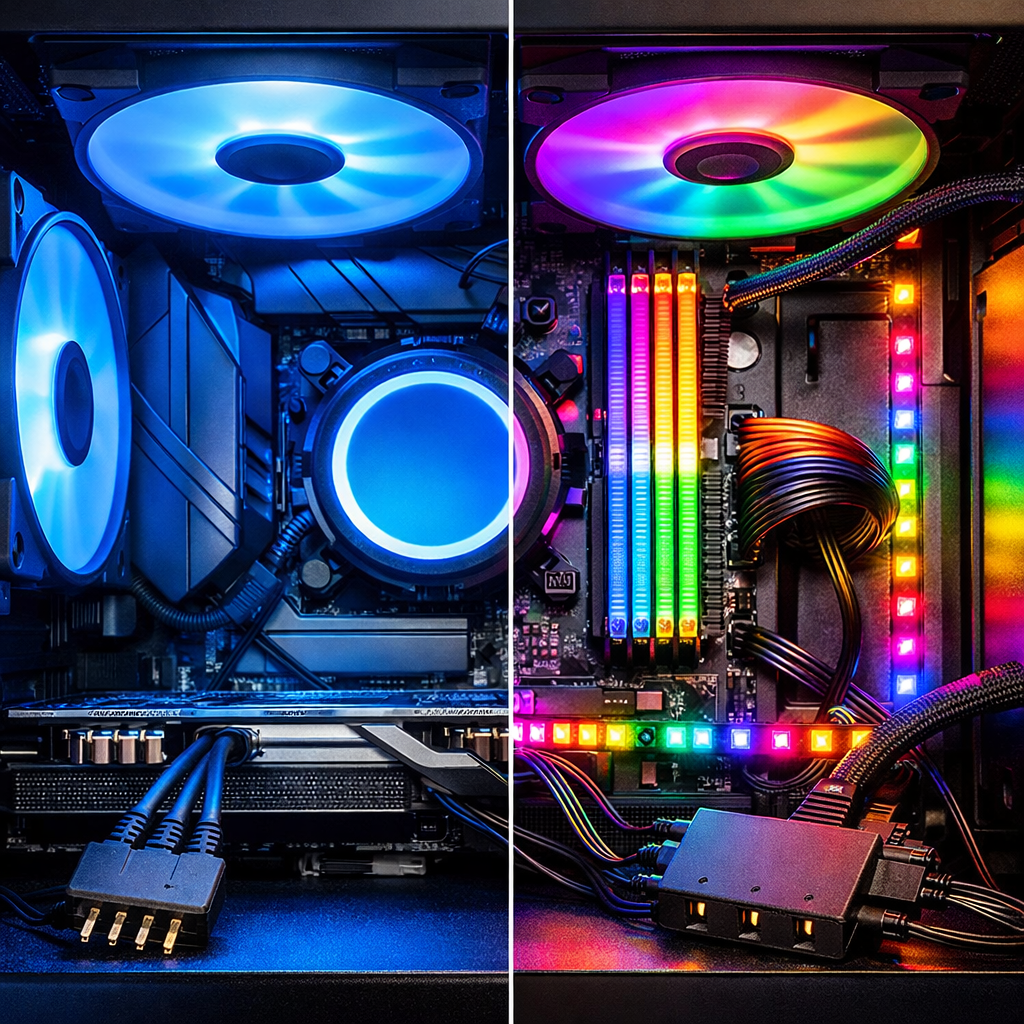
RGB vs ARGB for Gaming Rigs: Compatibility, Control, and Value
Choosing lighting for a gaming rig comes down to how much control you want, what your motherboard supports, and how cleanly you can wire it. For most new builds, addressable RGB (ARGB) is the better long-term value: it gives per-LED control for gradients, chase, and game/screen sync effects via 5V, 3‑pin headers. Standard RGB is simpler and cheaper, driving all LEDs the same color/effect over 12V, 4‑pin headers—great if you only want a unified glow. The best setup pairs your board’s headers with a tidy hub and one stable control app, while prioritizing airflow and quiet fans first. That’s the approach we standardize on at Gaming Device Advisor. This guide distills the differences, safety must‑knows, and real‑world picks, backed by vendor documentation and platform tests from sources like the Skydimo guide and be quiet! explainer.
Quick answer for most gamers
Choose ARGB for 2025–2026 builds if you want per‑LED control, modern effects, and easier ecosystem integration; choose RGB if you only want simple, uniform lighting at the lowest cost. ARGB delivers digital, per‑LED animations, while RGB offers basic static and breathing effects at lower prices Skydimo guide.
Safety first: never mix 5V ARGB and 12V RGB headers—mismatching voltages can permanently damage devices darkFlash guide.
- Pick ARGB if you want gradients, chase waves, audio/game/screen sync, or plan to expand later Skydimo guide.
- Pick RGB if you want static/breathing effects, the lowest price, and the simplest wiring UK Gaming Computers explainer.
- Mixed approach: ARGB in visible zones (front fans, GPU brace, monitor halo), RGB in indirect areas (rear exhaust, under‑shroud) for maximum visibility per dollar AceGeek comparison.
Looking for a full build recommendation? See our best gaming PC roundup at Gaming Device Advisor’s home page: Best gaming PCs and tips from Gaming Device Advisor.
What RGB and ARGB mean
RGB lighting drives red, green, and blue channels together, so every LED on a device shows the same color and effect. It commonly uses a 4‑pin 12V header (marked +12V, R, G, B) and supports simple effects like solid colors, fades, and breathing without per‑LED variation UK Gaming Computers explainer.
Addressable RGB (ARGB) sends digital data down a single line so each LED can display a different color or pattern at the same time. It typically uses a 3‑pin 5V header (marked +5V, Data, Ground), enabling gradients, chase, wave, rainbow, and screen‑sync animations across segments or individual LEDs Skydimo guide.
- RGB effects: solid, fade, breathing.
- ARGB effects: gradients, rainbow, wave, chase, per‑LED animations—and it’s increasingly the modern standard in peripherals and cases AceGeek comparison.
Electrical standards and connector types
An addressable signal is a digital data stream that tells each LED its color and brightness in sequence, unlike analog RGB which varies voltage on R/G/B channels to set a single color for all LEDs on that device be quiet! explainer.
Core specs:
- 4‑pin RGB: +12V, R, G, B; analog control for uniform color/effects Sunbeamtech overview.
- 3‑pin ARGB: +5V, Data, Ground; digital, per‑LED control with one data line Skydimo guide.
Safety callout
Never plug a 5V ARGB device into a 12V RGB header. Keyed housings aren’t foolproof; a forced or misaligned connection can still make destructive contact. Always read header labels and your manual before connecting be quiet! explainer and Sunbeamtech overview.
Compatibility with modern motherboards
Most current motherboards include both 12V RGB (4‑pin) and 5V ARGB (3‑pin) headers; mid‑range and high‑end boards since around 2019 typically expose at least one ARGB header Sunbeamtech overview.
Quick check:
- Inspect silkscreen text for “RGB_LED” (12V, 4‑pin) and “ADD_RGB/ARGB/D_LED” (5V, 3‑pin) Sunbeamtech overview.
- Confirm pin labels: +12V vs +5V/Data/GND.
- Review your manual for header power limits and recommended hubs/splitters be quiet! explainer.
On legacy or budget boards with only 12V RGB, either stick to RGB devices or add an external, SATA‑powered ARGB controller/hub designed to accept 5V devices—don’t adapt voltages incorrectly be quiet! explainer.
Control and software ecosystems
- RGB control: basic colors and simple effects via motherboard utilities; good enough for a unified accent Skydimo guide.
- ARGB control: dynamic, per‑LED effects, audio‑reactive and game‑sync features thanks to its digital data stream Sunbeamtech overview.
Recommended software paths:
- Motherboard suites like ASUS Armoury Crate/Aura Sync or MSI Mystic Light for one‑vendor rigs.
- Windows Dynamic Lighting as a universal baseline on Windows 11.
- OpenRGB for cross‑brand setups; iCUE is solid if you centralize on Corsair controllers. ARGB also enables screen‑sync mapping that assigns strip segments to on‑screen areas for immersive bias lighting Skydimo guide.
Tip
Use a single “master” app to avoid conflicts. If you must mix ecosystems, disable device duplication in secondary apps and centralize control on a dedicated controller or powered hub be quiet! explainer.
Installation complexity and cable management
Step‑by‑step wiring plan:
- Map every device by header type: 12V RGB vs 5V ARGB.
- Count total ARGB devices; if you’re adding several fans/strips, use a SATA‑powered ARGB hub to avoid overloading a single header be quiet! explainer.
- Route data lines apart from fan PWM when possible, and label 5V vs 12V runs along the back panel.
Cable management tactics:
- Keep daisy‑chains short and within vendor specs; don’t force connectors. Rely on labels and pinouts—keying is not guaranteed protection Sunbeamtech overview.
- Mount hubs near SATA power and central cable channels to reduce clutter.
Quick checklist:
- Confirm header voltage before every connection Skydimo guide.
- Prefer powered hubs when running more than 3–4 ARGB devices on one channel be quiet! explainer.
Need help balancing looks with airflow? See our airflow and cable management tips on Gaming Device Advisor: airflow and cable management tips.
Pricing, performance, and total value
RGB hardware is simpler and usually cheaper per fan/strip, while ARGB commands a premium for per‑LED effects and often requires brand‑specific controllers for best results Skydimo guide and darkFlash guide. For power budgeting, typical estimates land around ~0.24 W per RGB segment and ~0.3 W per ARGB LED at full white; large ARGB arrays benefit from powered hubs and mindful SATA power distribution Eureka Ergonomic estimate.
Comparison at a glance:
| Setup tier | Hardware cost (per fan/strip) | Controller need | Effect complexity | Setup time | Ecosystem compatibility | Value take |
|---|---|---|---|---|---|---|
| Budget RGB | Lower | Often none (direct to 12V header) | Basic (solid/breathe) | Fast | Broad, simple | Best if you want a single color on a tight budget |
| Mid ARGB | Moderate | Motherboard ARGB header or basic hub | Per‑LED (gradients/chase) | Moderate | Good across brands with OpenRGB/Dynamic Lighting | Sweet spot for modern builds |
| High‑end ARGB | Higher | Brand controller + powered hub | Advanced sync/screen mapping | Longer | Strong within brand suites | Best showcase look, highest cost/complexity |
Use cases and recommendations
- Budget/first build: Choose 12V RGB fans/strips for a unified accent color, minimal software overhead, and the lowest price. Ideal for one‑header setups UK Gaming Computers explainer.
- Showcase build/streaming: Go 5V ARGB across visible zones—front intake fans, GPU support, case front panel—for gradients and motion that read well on camera Skydimo guide.
- Mixed‑value rig: Use ARGB where your eye lands (monitor halo, tempered‑glass frontage) and RGB for indirect lighting (under PSU shroud) to maximize impact per dollar AceGeek comparison.
- Small form factor: Centralize on a powered ARGB hub to reduce header strain and cable clutter; plan short, labeled runs be quiet! explainer.
Quick decision flow:
- Want dynamic effects or sync? Choose ARGB.
- Only want a single static color? Choose RGB.
- Multiple devices, one header? Use a powered ARGB hub be quiet! explainer.
Side-by-side comparison summary
| Feature | RGB | ARGB |
|---|---|---|
| Header/pins/voltage | 4‑pin, +12V, R, G, B | 3‑pin, +5V, Data, Ground |
| Control type | Analog per‑channel for one unified color/effect | Digital per‑LED control over a data line |
| Effects | Solid, fade, breathing | Gradients, rainbow, wave, chase, screen‑sync |
| Cost | Lower | Higher |
| Software support | Basic via motherboard suites | Broad: motherboard suites, Windows Dynamic Lighting, OpenRGB, brand controllers |
| Safety if mismatched | Plugging 3‑pin ARGB into 4‑pin RGB can cause damage | Same risk in reverse; always match 5V vs 12V |
| Typical use cases | Budget accents, simple unified glow | Showcase builds, dynamic effects, mixed ecosystems |
Key facts: RGB uses 12V 4‑pin analog control; ARGB uses 5V 3‑pin digital, enabling per‑LED effects and more complex animations—never mix the two voltages improperly Sunbeamtech overview and Skydimo guide.
Editor-tested guidance from Gaming Device Advisor
Our take: prioritize thermals and acoustics, then layer lighting. If two fan kits cost the same, pick the one with quieter bearings and a wider PWM range; lighting is secondary. Keep ARGB where it’s visible and impactful, and cap daisy‑chains to 3–4 devices per channel before offloading to a powered hub to protect headers and simplify control be quiet! explainer.
Frequently asked questions
Can I plug a 3-pin ARGB device into a 4-pin RGB header?
No. A 3‑pin 5V ARGB device should never go into a 4‑pin 12V RGB header; mismatching voltages can damage LEDs and controllers. Gaming Device Advisor’s rule: always match 5V vs 12V labels before connecting.
How do I know if my motherboard supports ARGB or RGB?
Check the motherboard’s headers and labels—Gaming Device Advisor’s quick rule: 4‑pin +12V is RGB; 3‑pin +5V/DATA/GND is ARGB. Your manual usually lists both if supported.
Do I need a hub for multiple ARGB fans and strips?
Often yes—Gaming Device Advisor recommends a powered hub once you exceed 3–4 devices or have limited header capacity. It safely distributes power and data across devices.
Which software should I use to sync lighting across brands?
Use your motherboard’s suite for simplicity. For mixed‑brand setups, Gaming Device Advisor suggests a universal Windows 11 tool that supports multiple vendors.
Is RGB good enough if I only want a single static color?
Yes—RGB is cheaper and simpler for a unified glow or slow effects. Gaming Device Advisor recommends ARGB if you want gradients, chases, or screen‑sync lighting.